The Hepsia hosting Control Panel
Hepsia Domain Manager
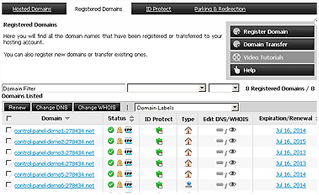 You can now register, transfer and administer multiple domains & websites from just one single location. This is something cPanel has immense troubles with. In fact, there is no Domain Manager section whatsoever in cPanel. With the Hepsia web hosting Control Panel, you can build and administer multiple totally autonomous websites under a single hosting account. There's no need to have separate Control Panel interfaces (i.e. logins) for your domain names, support tickets and billing transactions.
See how the Hepsia Domain Manager works | Play Video
Hepsia File Manager
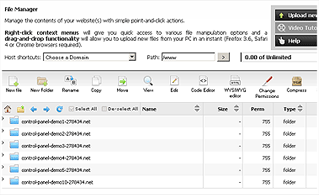 With drag 'n' drop file uploads allowed, now this is something really incredible - you no longer need an FTP client to transfer files. Simply select the files on your PC and drag them over to your browser window - the upload will begin instantly. You will also be able to move files around the File Manager using the built-in drag 'n' drop functionality.
See how the Hepsia File Manager works | Play Video
Hepsia Email Manager
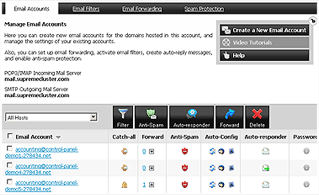 Hepsia's Email Manager enables you to redirect e-mails, to set up autoresponders with just a single click, to finetune e-mail filters and to shield your email mailbox accounts against spam messages. You can configure the desktop email client of your liking to access your email boxes or manage them through a webmail client.
See how the Hepsia Email Manager works | Play Video
More than Five Hundred Unique Features
The Domain Manager, the File Manager and the Email Manager are just some of the tools integrated into the Hepsia web hosting Control Panel. We also give you a easy way to manage MySQL and PgSQL databases via our Database Manager. Our Stats Manager gives a complete overview over all the relevant stats for your site. There is also an enormous collection of cost-free extras coming with the Hepsia hosting CP - a web site installer, a web apps installation tool, a PHP frameworks installation tool, free web site skins, a cost-free sitemap generator, etc. There is also a variety of marketing and administrative tools, including an .htaccess Generator tool, a PHP Configuration tool, a URL Redirection tool, a Password Protection tool, a Domain Parking & Redirection tool, a collection of web accelerators and more. Also, the Hepsia web hosting Control Panel has an SSL Certificates section, from where you can get SSL certificates for your sites.
If you are interested, you can check out our Hepsia vs. cPanel comparison and see how these hosting control panels cope with different website hosting tasks.
| KVM VPS |
| 80 GB storage |
| 4 TB bandwidth |
| Unlimited websites hosted |
| 24/7/365 support |
| start from $14.50/mo |